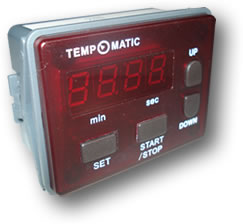
Type:
K400-2: Timer / K400-2B: Signal clock |
| |
|
| |
|
FEATURES:
- A microprocessor
based count-down timer with LED display.
- Simple
and user friendly operation
- Time
is shown by a 4x7 segments LED on the panel.
- A 16
A (resistive) SPST relay is used to control external appliance.
- Available
in two different versions:
- up
to 99 min. 59 sec.
- up
to 99 hour 59 min.
- Available
also without relay as signal clock
|
ELECTRICAL
PARAMETERS:
- Imput
voltage: 200-240 VAC; 45-55 Hz
- Output
current: 16A resistive.
- Operating
temperature: 0°C to 70°C
- Storage
temperature: -20°C to +80°C
|
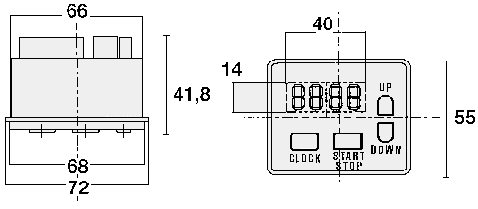
DIMENSIONS:
- 66x55x41,8
- Hole
in the panel mm 66x49
- Depth
39 mm
|
| |
|
|
COUNT-DOWN
OPERATION
Press SET for the set up of the count-down.
Depending on the hours/min or min/sec versions, the timer will
at first flash on "minutes" or "seconds".
Press now UP or DOWN to set the desired setting.
Afterwards, if you wish to increase the setting, press SET again.
Now the timer will flash on "hours" or "minutes".
(Note that if SET is not pressed, after some seconds the desired
setting is automatically memorized).
After the desired setting is set, for starting the count-down,
press START.
The count-down can be stopped at any time by pressing STOP.
The timer will show again the set up previously set.
When the count-down finishes, the timer will emit a sound signal
for about 10 sec.
For resetting the set up, press SET for some second. |